Showing posts with label easy. Show all posts

Friday, 12 January 2018

How to earn special cash back with every order using Flipkart

It is a very simple way to earn additional discounts from Flipkart.
If stuck at any step, please ask in the comments below.
This method will always work with all the products available in the flipkart. It is the employee's discount which you will receive in your flipkart wallet.
1. Open Flipkart.com
2. Go to the page of the product you wish to buy.
3. Now look at the top where URL(link) is present.
4. The link will be like 
http://www.flipkart.com/apple-iphone-5s/p/itmdv6f75dyxhmt4?pid=MOBDPPZZDX8WSPAT&srno=b_1&ref=2e406ace-1f7b-4175-882c-b04f32f1fcca
5. Change the purple part of the link &ref=2e406ace-1f7b-4175-882c-b04f32f1fcca with &affid=rishunk16
6. Finally the link will look like
http://www.flipkart.com/apple-iphone-5s/p/itmdv6f75dyxhmt4?pid=MOBDPPZZDX8WSPAT&srno=b_1&affid=rishunk16
7. Now you may buy the product and get up to 30% cash back in your Flipkart Wallet immediately after the payment is done.

HATE SUCH STEPS?
Simply click on the employee's flipkart link
www.flipkart.com 

Friday, 20 July 2012

How To Convert .docx To .doc Files


If you’re using the old version of microsoft office , then you probably have a problem with loading the . docx files . Here is brief tutorial that explains how to convert .docx to .doc files by using free service google docs .
1) Go to docs.google.com and log in your account, if you don’t have accout then create it for free .
2) Click on Upload -> Files…
3) Choose .doc file that you want to convert and click start upload
4) Open .docx file that you want to convert and click on File -> Download as ->Microsoft Word 97 -2003 (.doc)

Saturday, 14 July 2012

Download Windows Password Remover [ISO]


Windows Password Remover1Windows Password Remover a software to reset lost Windows administrator and user passwords . In short you can access any of the supported operating system without having the password. It supports passwords of all Windows versions, viz. , Windows 7, Windows Vista, XP, 2008, 2003 and 2000, etc.


Steps :
  1. Burn the given iso to a CD.
  2. Boot from the cd.
  3. Wait untill it asks any thing from you (Some time).
  4. Go according to the onscreen instructions (very simple) and reset the password.
Download Windows Password Remover ( ISO File – 9 MBs )

How To Change Downloads Folder Location In Windows 7


Change Default Download Location In Windows1
All of us love downloading files from the internet. But by default the downloads folder in Windows 7 resides at “C:\Users\User-name\Downloads”. Since C drive is dedicated to Windows so we must not keep our files in this drive. Also in most cases this drive is of less size. So to permanently move this folder to some other location or other drive we can change the location easily and all the old files will get moved to the new location and the new downloads will automatically be downloaded at the new location.

Steps To Change Downloads Folder Location In Windows 7 :

1. Open Computer and in the left pane select Downloads under the favorite menu.
Change Default Download Location In Windows Screenshot 11

2. Right click in the empty area and select properties.
Change Default Download Location In Windows Screenshot 21

3. Select the Location tab and enter the location where you want to store your download files. You can also browse the location by pressing the Move button.
Change Default Download Location In Windows Screenshot 31

4. It will ask for moving the old files , if you want to move all the old files to the new location then select yes else select no.
Change Default Download Location In Windows Screenshot 41


MSCONFIG : Speed Up Your Computer Without Any Software


MSCONFIG or “Microsoft System Configuration Utility” is designed to help you troubleshoot problems with your computer.
It is an inbuilt utility that lets you select applications which you want to start up on windows boot up and application that you don’t want to start up with windows. You can open msconfig by pressing “Windows Key + R” or in Windows 7 and Vista , type msconfig in search bar and press enter.
After Opening MSCONFIG, go to Startup tab as shown below. Now deselect applications that you want to stop loading with windows. When done press OK. Restart your computer and you will see that your computer now starts faster.
Fullscreen+capture+9112011+34518+PM.bmp3

Please Comment in case you've any type of problem regarding using this.

How To Block A Program From Using Your Internet Connection


Windows Firewall Block A Program4A way to block your applications from using your internet connection. This can be useful when you don’t want an application to update or to stop an application from checking that the serial or the crack you applied was genuine or not.

12
Open Control Panel From Start Menu
21
Open Windows Firewall From Control Panel
31
Choose Advanced Setting on the left side In Windows Firewall Window
41
A windows like this will pop up
51
Select Outbound Rules From Left Side
61
A windows Similar to the above will Pop up , click next.
71
Give the program path , choose the exe file of the program ( you can find it from the program installation directory ). After selecting the appropriate directory press next.
81
Select Next
93
Select Next
102
Give any name , usually we keep the programs name for future reference. Click Finish and your program will be listed as black list and will not be able to connect to the internet.

Wednesday, 11 July 2012

Boost Your Wi-Fi Signal Using an empty Beer Can

Boost Your Wi-Fi Signal Using a Beer CanSo internet is used by everyone and if you are @ home you will always want that your whole house is covered by Wi-Fi so that anytime, anywhere you can access it so internet speed is must @ long distance well now you can get some nice Wi-Fi Boosting using a simple and efficient Beer Can well I grabbed this amazing trick from Discovery Channel’s Website and I am posting it on my website.
Follow the below steps to boost your Wi-Fi Network :
Boost Your Wi-Fi Signal Using a Beer Can

Step 1.


Empty a Beer can obliviously after drinking that and than you have to make sure that its washed thoroughly so that there is no smell or anything left by that liquid Beer, because if anything's is left than it will be a problem and smell will be there in your whole room.

Boost Your Wi-Fi Signal Using a Beer Can

Step 2.


Now after washing that Beer Can thoroughly you have to remove that small can opening piece you can see that in the image on the right hand side.


Step 3.


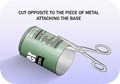
Boost Your Wi-Fi Signal Using a Beer CanNow after you have removed the small can opening piece you can to cut the can in the round diameter like in the image on the right hand side, we are doing this because we have to open that can and make a shape like small antenna.


Step 4.


Boost Your Wi-Fi Signal Using a Beer CanSo now you have to repeat the same step on the other corner but this time you have to leave small space between the cuts so that the can remains attached to the bottom and we will have a look of antenna for our modem - router for boosting purpose. So remember this step is really important to follow else your antenna will not look like how it should be.
Boost Your Wi-Fi Signal Using a Beer Can

Step 5.


So now the main steps are completed, now you have to cut the can vertically from between like in the image on the right hand side. and your antenna will take looks like how it should be and now you only have to attach this antenna to your modem so that we can se its effect.

Boost Your Wi-Fi Signal Using a Beer Can

Step 6.


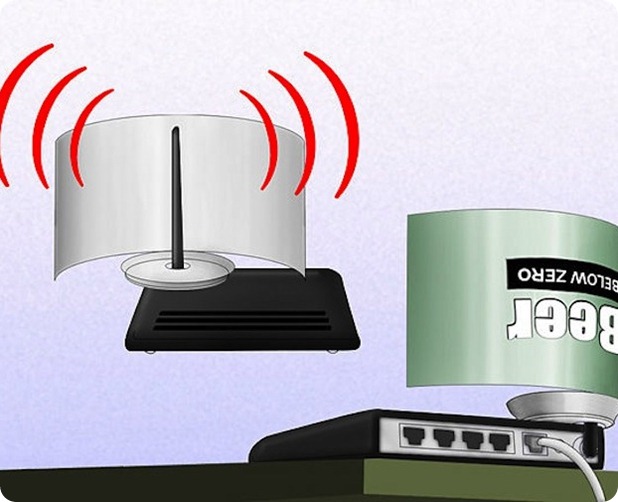
Now last step is too attach this antenna to your modem - router, you can use any adhesive or M-Seal which has really a good hold, so in this step you can change directions of your antenna suiting your will, like in which direction you want it too boost the signal.


Step 7.


Now your antenna is ready for boosting purpose and it will look something like below you can check the image below.
Boost Your Wi-Fi Signal Using a Beer Can
[ Image Credits and Source : Discovery.com ]

Making IDM full-version without patching.


I scrambled the internet to get a fine easy solution and I came across HOSTS File trick which will accept below serials and will not reject it.
So just check out the below trick on how to make IDM ( Internet Download Manager ) full version through HOSTS File Trick. The procedure is really easy to follow and you can make this happen just in few seconds.

Follow below steps :


1. Make sure you have installed the latest version of IDM if you do not have it you can download it from the official creators website.
2. Now after you have downloaded and installed the latest version just close the IDM and now go to start menu and make a search for Notepad.
3. Now right click on Notepad and than Run It As Administrator.
4. Now navigate to C: > Windows > System 32 > Drivers > etc. > Hosts.
5. When you are in the etc. folder you might not see any files their as you have click on show all files on the right hand side below.
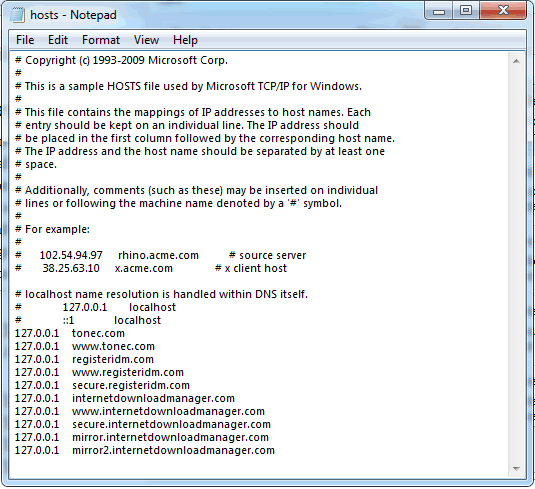
6. Now open the Hosts file and paste all the below lines like in the image.


127.0.0.1    tonec.com
127.0.0.1    www.tonec.com
127.0.0.1    registeridm.com
127.0.0.1    www.registeridm.com
127.0.0.1    secure.registeridm.com
127.0.0.1    internetdownloadmanager.com
127.0.0.1    www.internetdownloadmanager.com
127.0.0.1    secure.internetdownloadmanager.com
127.0.0.1    mirror.internetdownloadmanager.com
127.0.0.1    mirror2.internetdownloadmanager.com


Hosts File
7. So now as you can see in the above image how I have pasted all the lines @ the end of the Hosts file, you have to do same as above, now hit save.
8. Now when you have saved the HOSTS File you can simply enter any serials from below in your IDM Registration page.


RLDGN-OV9WU-5W589-6VZH1
HUDWE-UO689-6D27B-YM28M
UK3DV-E0MNW-MLQYX-GENA1
398ND-QNAGY-CMMZU-ZPI39
GZLJY-X50S3-0S20D-NFRF9
W3J5U-8U66N-D0B9M-54SLM
EC0Q6-QN7UH-5S3JB-YZMEK
UVQW0-X54FE-QW35Q-SNZF5
FJJTJ-J0FLF-QCVBK-A287M


9. Now enjoy your full version IDM without purchasing or patching its totally genuine and totally legal, you can update and it will still work like a charm so if you still have any queries than make sure to comment below.

Get Quality Backlinks for your Website Totally Free

Backlinks have a really important place when it comes to website reputation, if you have some good backlinks for your website than you will rank higher in search engines.

SiteValue Stats
Follow below steps :


2. Now you will a simple webpage like so insert your website like I have done in the below image.

3. Now after you have inserted your website simply click on Submit and do not close your window as it will process all the Backlinks right in front of your eyes.

4. So that’s it now enjoy free 300+ quality backlinks right for your website.

How to Post Status Updates in Blue Color on Facebook


 today we are again back with another amazing trick for posting Blue text messages on Facebook wall or commenting with your message in Blue Color. Well so when ever person will click on the status he will be taken to his own profile. So just check out the steps below and have fun.


Steps for Posting Blue Status on Facebook :


1. Go to Facebook.com and Login with your Credentials.

2. Now go to update status link and paste below code, and change the text saying YOUR TEXT HERE with your own text you want in blue color like.

@[1: ]@@[1:[0:1: Your Text Here ]]

3. Now after you have done writing your text click on Post and Voila ! you will have your status in Blue Color which is dam ! awesome.


4. So isn’t this amazing trick to make text Blue in color so enjoy impressing your friends on Facebook and do share this trick if they ask you how its done.

How to Skip or Bypass Adf.ly - Adfoc and Linkbucks Links


Adf.ly, Adfoc and Linkbucks are the URL shorteners that pays you when people browse your shortened links, they do pay and they are not a scam but the paying ratio is not good its like 1000 views for $1 in India, hmm maybe it pays huge for other countries but well all the shortened links are really annoying because when ever you visit any website and you click on their links than you have to wait like 5 sec and than you click on the Skip Ad Button, well but now if you wanna skip them automatically than we have few good ways for this thing.


1. Using AdsFight! Userscript :

Well if you use Chrome or Firefox than the best way to skip or bypass these links is to install a simple userscript called "AdsFight!", it’s a simple one time install bypasser which automatically skips links as soon as you click on them.

Installing AdsFight! on Chrome : Well if you are on chrome you can just install AdsFight! userscript directly, just hit the Install Button and enjoy bypassing links.
Installing AdsFight! on Firefox : If you use Firefox for browsing activities than first you have to install the Greasemonkey Addon and than install the same AdsFight! Userscript.

2. Using DeadFly Online Bypasser Tool :

Deadfly URL
DeadFly URL is another online tool used for skipping or bypassing these shortened annoying links on the web. You just need to navigate to their website and paste the Adf.ly or Adcraft.co link and press Deadfly! boom you will be taken to the original source website.
So these were the two methods that can be used for this job, well I think so the above 1 method is the best one as it just needs one time installation and works simply automated. Well try them out and use the one which you feel confortable with.

Complete List of Run Commands for Easy Access in Windows


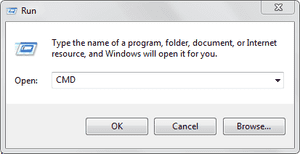
run-panel-cmdRun commands are really useful as it can open your services on the go by just inserting some key-words, well finding them manually from the control panel is a big headache, so we are bringing you some of the useful commands for the RUN Panel which will surely boost your work creativity.

A

Accessibility Controls - access.cpl
Accessibility Wizard - accwiz
Add Hardware Wizard - hdwwiz.cpl
Add/Remove Programs - appwiz.cpl
Administrative Tools - control admintools
Adobe Acrobat (if installed)- acrobat
Adobe Designer (if installed)- acrodist
Adobe Distiller (if installed)- acrodist
Adobe ImageReady (if installed)- imageready
Adobe Photoshop (if installed) - photoshop
Automatic Updates - wuaucpl.cpl

B

Bluetooth Transfer Wizard – fsquirt


C

Calculator - calc
Certificate Manager - certmgr.msc
Character Map - charmap
Check Disk Utility - chkdsk
Clipboard Viewer - clipbrd
Command Prompt - cmd
Component Services - dcomcnfg
Computer Management - compmgmt.msc
Control Panel – control


D

Date and Time Properties - timedate.cpl
DDE Shares - ddeshare
Device Manager - devmgmt.msc
Direct X Control Panel (If Installed)* - directx.cpl
Direct X Troubleshooter - dxdiag
Disk Cleanup Utility - cleanmgr
Disk Defragment - dfrg.msc
Disk Management - diskmgmt.msc
Disk Partition Manager - diskpart
Display Properties - control desktop
Display Properties - desk.cpl
Display Properties (w/Appearance Tab Preselected) - control color
Dr. Watson System Troubleshooting Utility - drwtsn32
Driver Verifier Utility – verifier


E

Event Viewer - eventvwr.msc


F

Files and Settings Transfer Tool - migwiz
File Signature Verification Tool - sigverif
Findfast - findfast.cpl
Firefox (if installed) - firefox
Folders Properties - control folders
Fonts - control fonts
Fonts Folder - fonts
Free Cell Card Game – freecell


G

Game Controllers - joy.cpl
Group Policy Editor (XP Prof) - gpedit.msc


H

Hearts Card Game - mshearts
Help and Support - helpctr
HyperTerminal – hypertrm


I

Iexpress Wizard - iexpress
Indexing Service - ciadv.msc
Internet Connection Wizard - icwconn1
Internet Explorer - iexplore
Internet Properties - inetcpl.cpl
Internet Setup Wizard - inetwiz
IP Configuration (Display Connection Configuration)- ipconfig /all
IP Configuration (Display DNS Cache Contents) - ipconfig /displaydns
IP Configuration (Delete DNS Cache Contents) - ipconfig /flushdns
IP Configuration (Release All Connections) - ipconfig /release
IP Configuration (Renew All Connections) - ipconfig /renew
IP Configuration (Refreshes DHCP & Re-Registers DNS) - ipconfig /registerdns
IP Configuration (Display DHCP Class ID) - ipconfig /showclassid
IP Configuration (Modifies DHCP Class ID)- ipconfig /setclassid


J

Java Control Panel (If Installed) - jpicpl32.cpl
Java Control Panel (If Installed) – javaws


K

Keyboard Properties - control keyboard


L

Local Security Settings - secpol.msc
Local Users and Groups - lusrmgr.msc
Logs You Out Of Windows – logoff


M

Malicious Software Removal Tool - mrt
Microsoft Access (if installed) - access.cpl
Microsoft Chat - winchat
Microsoft Excel (if installed) - excel
Microsoft Frontpage (if installed) - frontpg
Microsoft Movie Maker - moviemk
Microsoft Paint - mspaint
Microsoft Powerpoint (if installed) - powerpnt
Microsoft Word (if installed) - winword
Microsoft Syncronization Tool - mobsync
Minesweeper Game - winmine
Mouse Properties - control mouse
Mouse Properties - main.cpl


N

Nero (if installed) - nero
Netmeeting - conf
Network Connections - control netconnections
Network Connections- ncpa.cpl
Network Setup Wizard - netsetup.cpl
Notepad - notepad
Nview Desktop Manager (If Installed) - nvtuicpl.cpl


O

Object Packager – packager
ODBC Data Source Administrator - odbccp32.cpl
On Screen Keyboard - osk
Opens AC3 Filter (If Installed)- ac3filter.cpl
Outlook Express – msimn


P

Paint - pbrush
Password Properties - password.cpl
Performance Monitor - perfmon.msc
Performance Monitor - perfmon
Phone and Modem Options - telephon.cpl
Phone Dialer - dialer
Pinball Game - pinball
Power Configuration - powercfg.cpl
Printers and Faxes - control printers
Printers Folder - printers
Private Character Editor – eudcedit


Q

Quicktime (If Installed) - QuickTime.cpl
Quicktime Player (if installed) – quicktimeplayer


R

Real Player (if installed) - realplay
Regional Settings - intl.cpl
Registry Editor - regedit
Registry Editor - regedit32
Remote Access Phonebook - rasphone
Remote Desktop - mstsc
Removable Storage - ntmsmgr.msc
Removable Storage Operator Requests - ntmsoprq.msc
Resultant Set of Policy (XP Prof) - rsop.msc


S

Scanners and Cameras - sticpl.cpl
Scheduled Tasks - control schedtasks
Security Center - wscui.cpl
Services - services.msc
Shared Folders - fsmgmt.msc
Shuts Down Windows - shutdown
Sounds and Audio - mmsys.cpl
Spider Solitare Card Game - spider
SQL Client Configuration - cliconfg
System Configuration Editor - sysedit
System Configuration Utility - msconfig
System File Checker Utility (Scan Immediately) - sfc /scannow
System File Checker Utility (Scan Once At Next Boot)- sfc /scanonce
System File Checker Utility (Scan On Every Boot)- sfc /scanboot
System File Checker Utility (Return to Default Setting) - sfc /revert
System File Checker Utility (Purge File Cache) - sfc /purgecache
System File Checker Utility (Set Cache Size to size x) - sfc /cachesize=x
System Information - msinfo32
System Properties - sysdm.cpl


T

Task Manager - taskmgr
TCP Tester - tcptest
Telnet Client - telnet
Tweak UI (if installed) – tweakui


U

User Account Management - nusrmgr.cpl
Utility Manager – utilman


W

Windows Address Book - wab
Windows Address Book Import Utility - wabmig
Windows Backup Utility (if installed) - ntbackup
Windows Explorer - explorer
Windows Firewall - firewall.cpl
Windows Address Book - wab
Windows Address Book Import Utility - wabmig
Windows Backup Utility (if installed) - ntbackup
Windows Explorer - explorer
Windows Firewall - firewall.cpl
Windows Magnifier - magnify
Windows Management Infrastructure - wmimgmt.msc
Windows Media Player - wmplayer
Windows Messenger - msmsgs
Windows Picture Import Wizard (need camera connected) - wiaacmgr
Windows System Security Tool - syskey
Windows Update Launches - wupdmgr
Windows Version (to show which version of windows) - winver
Windows XP Tour Wizard - tourstart
Here ends the list of these useful commands, well hope that these commands really increase your productivity and hence fasten your work experience, enjoy and do share this post with all your friends.