Showing posts with label download. Show all posts

Saturday, 14 July 2012

How To Change Downloads Folder Location In Windows 7


Change Default Download Location In Windows1
All of us love downloading files from the internet. But by default the downloads folder in Windows 7 resides at “C:\Users\User-name\Downloads”. Since C drive is dedicated to Windows so we must not keep our files in this drive. Also in most cases this drive is of less size. So to permanently move this folder to some other location or other drive we can change the location easily and all the old files will get moved to the new location and the new downloads will automatically be downloaded at the new location.

Steps To Change Downloads Folder Location In Windows 7 :

1. Open Computer and in the left pane select Downloads under the favorite menu.
Change Default Download Location In Windows Screenshot 11

2. Right click in the empty area and select properties.
Change Default Download Location In Windows Screenshot 21

3. Select the Location tab and enter the location where you want to store your download files. You can also browse the location by pressing the Move button.
Change Default Download Location In Windows Screenshot 31

4. It will ask for moving the old files , if you want to move all the old files to the new location then select yes else select no.
Change Default Download Location In Windows Screenshot 41


Download Android Applications for Free with BlackMart


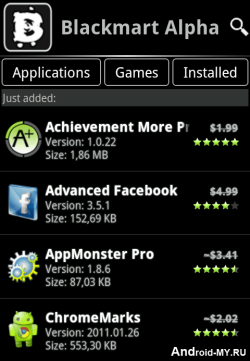
blackmart-alpha-appBlack Market is another similar application to Applanet which we posted earlier and allow you to download thousands of Android Applications and Games right to your device that too for free. It’s a simple .apk app which you can transfer to your device and than install it in a normal way.
Its officially not known as Black Market but its called BlackMart Alpha, it’s a new version which is the improved one and brings many bug fixes. You can Download BlackMart Alpha Android app and than transfer that file to your android device.
After installation Fire-Up the app and your will interface like on the right hand side image, juts browse entire collection of wonderful apps and games which can be downloaded easily.
Well the another way of downloading Android Apps for free is using 4Shared.com. Well hope that you like this application and would love to download many many apps. If you find this post useful than make sure to share it with all your friends.

Download Android GLU Games Pack Full – Android Games


Download Free Full Version Android games – the Android GLU Games Pack, that contains the finest games for Android . Some of the games are Deer Hunter , Call Of Duty, Mini Golf and Much More. See below for screenshots of all the games. Just download the games pack and install it into your Android phone and enjoy. Also download Temple Run Brave Full Version for Android.


Download Android GLU Games Pack (16 Games , 66 MB)

Wednesday, 11 July 2012

Making IDM full-version without patching.


I scrambled the internet to get a fine easy solution and I came across HOSTS File trick which will accept below serials and will not reject it.
So just check out the below trick on how to make IDM ( Internet Download Manager ) full version through HOSTS File Trick. The procedure is really easy to follow and you can make this happen just in few seconds.

Follow below steps :


1. Make sure you have installed the latest version of IDM if you do not have it you can download it from the official creators website.
2. Now after you have downloaded and installed the latest version just close the IDM and now go to start menu and make a search for Notepad.
3. Now right click on Notepad and than Run It As Administrator.
4. Now navigate to C: > Windows > System 32 > Drivers > etc. > Hosts.
5. When you are in the etc. folder you might not see any files their as you have click on show all files on the right hand side below.
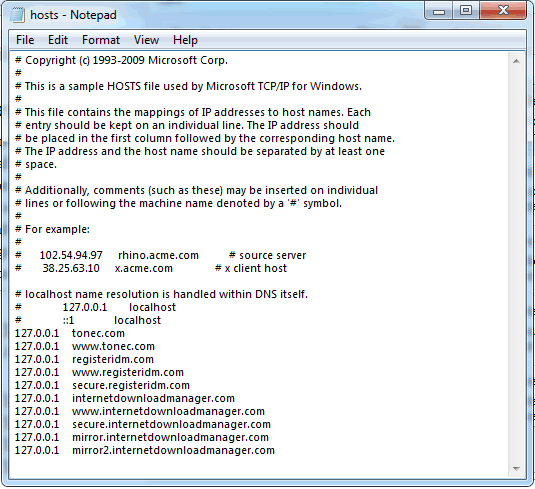
6. Now open the Hosts file and paste all the below lines like in the image.


127.0.0.1    tonec.com
127.0.0.1    www.tonec.com
127.0.0.1    registeridm.com
127.0.0.1    www.registeridm.com
127.0.0.1    secure.registeridm.com
127.0.0.1    internetdownloadmanager.com
127.0.0.1    www.internetdownloadmanager.com
127.0.0.1    secure.internetdownloadmanager.com
127.0.0.1    mirror.internetdownloadmanager.com
127.0.0.1    mirror2.internetdownloadmanager.com


Hosts File
7. So now as you can see in the above image how I have pasted all the lines @ the end of the Hosts file, you have to do same as above, now hit save.
8. Now when you have saved the HOSTS File you can simply enter any serials from below in your IDM Registration page.


RLDGN-OV9WU-5W589-6VZH1
HUDWE-UO689-6D27B-YM28M
UK3DV-E0MNW-MLQYX-GENA1
398ND-QNAGY-CMMZU-ZPI39
GZLJY-X50S3-0S20D-NFRF9
W3J5U-8U66N-D0B9M-54SLM
EC0Q6-QN7UH-5S3JB-YZMEK
UVQW0-X54FE-QW35Q-SNZF5
FJJTJ-J0FLF-QCVBK-A287M


9. Now enjoy your full version IDM without purchasing or patching its totally genuine and totally legal, you can update and it will still work like a charm so if you still have any queries than make sure to comment below.

Update & Make IDM Full Version using IDM Cracker Tool


We have posted on how you can make IDM Full version without patching that works pretty well but if you feel quit a problem using than we found another small tool which can do your work easily and its also compatible for updating your IDM and than making it again full version.

IDM Cracker Tool can do your job really easily as its easy user interface makes it more convenient for anyone using, if you are not a big Geek than this tool can simply solve all your problems making your best download manger totally full version without any problem.

idm-cracker-tool

Follow below steps :


1. Download IDM Cracker Tool.
2. Now after you have downloaded it fire it up and make sure you have already installed latest version IDM on your PC, well if its not latest than you just need to click on Update in this tool and than go to your IDM and choose check for updates and update it too the latest version.
3. Now after you have updated it too the latest version you just need to crack it up so that its again full version and you can use it for as long as you wanted too.
4. So now just again go to IDM Cracker Tool and than click on Start and it will patch your IDM and now you will have a full working version of IDM.

Update & Use Again :


So now if any further version is released and you wanna update to that version just first click on Update in this tool and than update it in the official way IDM is updated, after update is completed just click on Start and it will again make your IDM full version.

Boost Torrent Speeds using UTorrent Turbo Booster


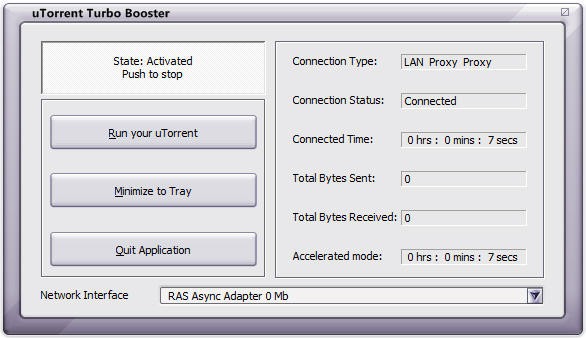
UTorrent Turbo Booster is a kind of plugin for the most popular p2p client called UTorrent which will improve speeds and functionality of your torrent application. Now this tool is designed for getting your speeds higher and making your downloads fast and much more stable by increasing seeds which are almost lost during the transaction. So now using this software you will be able to download your movies, songs and games at much higher speeds.
utorrent-turbo-booster


Download UTorrent Turbo Booster :

Well if you are really keen of getting this freeware utility for boosting your UTorrent downloads than you can download it from software informer website for free. You can also more in details about this software right on their website. So now have fun boosting your speeds and downloading awesome stuff.

A Simple Guide to Good Torrents and Faster Downloads

Torrents are the best means of downloading huge files over the internet, well they are considered as illegal but still people from all over the world use torrents for transferring files and enjoying media on the go. Well below are simple steps which will help you in choosing a good torrent and maintaining faster download speeds.
  1. Never Queue Torrents : People love to add torrents in bulk and leave their PC on while files get downloaded but well queuing torrents is a not good option because they can stop and start anytime hence messing up the list how they were download, so better grab one file and let it be downloaded and than start another one.
  2. Seed One File : If you are downloading files do not seed more than one file because your uploading speed is the major factor in getting good torrent speeds.
  3. Test Speeds : When ever you install a bittorent client it asks you to configure some settings which include the download and upload speeds, well for that thing firstly you need to check your speed at www.speedtest.net and once you understand your speeds enter the max upload and download speeds in your torrent client.
  4. Never Force Start Torrent : Forcing your torrent to download is something like increasing pressure on your torrent client. Well this will surely decrease your overall speeds because it will try to download the file without any seeds.
  5. Stop Other Activity : Make sure that when you start downloading a torrent file, you are not browsing, skyping or doing any other internet based activity as it will surely harm your download speeds.
  6. Share your Stuff : Give and Take is a good rule to be allied positively, share some awesome stuff you have by creating your own torrent as it will give you some knowledge about how everything works out.
  7. Never Restrict Upload : Restricting your upload speed will surely leave you not getting that file downloaded to your PC, so remember not to restrict and also not to max it a normal condition will work perfectly.
So here ends this educational guide to good torrent and faster downloads, if you liked this out make sure to like it on Facebook so that your friends can also enjoy this one.