Showing posts with label how to. Show all posts

Friday, 20 July 2012

How To Hide Any Drive Through Command Prompt


Have you ever thought of hiding any drive from your system so that no one can knew about it. You may have heard or even used a lot of software’s that might be able to do that, but if you want to do things by your own without using any 3rd party software than this tutorial will show you how you can do it.
Well there are 3 ways of doing it, in this tutorial we are covering command prompt way of doing it.

Here is how to do it:

Step 1. Open command Prompt, go to Start Menu > All Programs >Accessories > Command prompt
Step 2. In the Command Prompt, type Diskpart and hit enter key. If UAC (User Account Control), dialog-box prompts than click Yes.
Step 3. Then type List Volume and press enter, this will produce the list of all drives.
Step 4. Now select the drive which you want to hide, you can either do this by typing Select Volume 1 (i.e. Volume Number) or by typing Select Volume C(i.e. Drive letter)
Step 5. To hide a drive, type Remove Letter C. Here, C is the drive letter than you want to hide. You can use any drive letter you want.
Step 6. That’s it. You are done! C drive is now hidden

How to unhide hidden drive

Step 1. Follow the procedure mentioned in step 1, 2, 3 and 4.
Step 2. To show the hidden drive type Assign Letter C and hit enter, now you can view C: drive in explorer.
That’s it. This is one way of hiding and un-hiding drives from explorer, for rest stay tuned.

How To Create Your First Python Program


Wanna learn how to create your first python program , but don’t know where to start. This is beginner, step by step tutorial with images that will help you trough process.
Step 1
Go to python.org, download latest version and install it.
Step 2
Run IDLE (Python GUI)
Step 3
You can run program via python shell or you can run program as python module . py extension.
Step 3.1
Run program via python shell
In Python shell type
Code:
variable = 'Hello World'
and press enter
then type
Code:
print variable
and press enter, output will be Hello World
This is simple example where we store string “Hello World” into variable and then print it out.
Step 3.2
Run as python script . py
Open notepad and type your code
variable = 'Hello World'
print variable
save as HelloWorld.py
Open IDLE and go to File -> Open and open file with .py extension
After this will appear windows where you’ll able to run module, just press F5 or go to Run -> Run Module

How To Convert .docx To .doc Files


If you’re using the old version of microsoft office , then you probably have a problem with loading the . docx files . Here is brief tutorial that explains how to convert .docx to .doc files by using free service google docs .
1) Go to docs.google.com and log in your account, if you don’t have accout then create it for free .
2) Click on Upload -> Files…
3) Choose .doc file that you want to convert and click start upload
4) Open .docx file that you want to convert and click on File -> Download as ->Microsoft Word 97 -2003 (.doc)

Thursday, 19 July 2012

How To Recover Deleted Files For Free


In this post Im going to show you how to recover deleted files with Easeus Data Recovery Wizard Free Edition . It allows you to recover 1 GB data for free.
1) Download Easeus Data Recovery Wizard Free Edition from this LINK and install it on your PC
2) Launch Easeus Data Recovery Wizard and click on Deleted File Recovery
3)Select file types and Click Next
4) Select Partitions to scan Deleted Files and Click Next.
5) It will lists deleted files , select the file that you want to recover , (right click -> recover) .


Bypass 1 GB Limit :-)
Open regedit.exe :-)
Goto HKEY_LOCAL_MACHINE\SOFTWARE\DRWDemo :-)
Just delete DRWDemo Key :-)
Get Another 1 GB :-)

How To Bypass CAPTCHA Authorization Text


In this post I’m going to show you how to use google chrome extension to bypass CAPTCHA authorization text . It can be very useful for visually-impaired people .
1) Download Rumola Chrome Plugin
2) Click Add it to Chrome to Install this extension for Google Chrome.
3) Go to your Captcha/ReCaptcha page and Double-Click the Text field and wait about 5 seconds to read words and it will write it for you.
I tested Rumola Chrome Plugin on this PAGE , and it works fine!

How To Get Serial Key,Keygen,Patch Of Any Software


Here is simple, but useful google search hack that will help you to find serial key, keygen , patch of any software .

1. Go to google.com
2.Type this syntax in search bar ” 94FBR Product name with desired software” for example :
94fbr nero
94fbr avast
proxifier 94fbr
etc
94FBR was part of a Microsoft Office 2000 product key that was released on the internet that bypassed Microsofts activation system.Because it is a relatively uncommon term, when you add it to your search queries, it will generally return results of pages listing illegal serial numbers.

How To Crash A PC Using The E-bomb

This summary is not available. Please click here to view the post.

Saturday, 14 July 2012

How To Block A Program From Using Your Internet Connection


Windows Firewall Block A Program4A way to block your applications from using your internet connection. This can be useful when you don’t want an application to update or to stop an application from checking that the serial or the crack you applied was genuine or not.

12
Open Control Panel From Start Menu
21
Open Windows Firewall From Control Panel
31
Choose Advanced Setting on the left side In Windows Firewall Window
41
A windows like this will pop up
51
Select Outbound Rules From Left Side
61
A windows Similar to the above will Pop up , click next.
71
Give the program path , choose the exe file of the program ( you can find it from the program installation directory ). After selecting the appropriate directory press next.
81
Select Next
93
Select Next
102
Give any name , usually we keep the programs name for future reference. Click Finish and your program will be listed as black list and will not be able to connect to the internet.

Wednesday, 11 July 2012

Boost Your Wi-Fi Signal Using an empty Beer Can

Boost Your Wi-Fi Signal Using a Beer CanSo internet is used by everyone and if you are @ home you will always want that your whole house is covered by Wi-Fi so that anytime, anywhere you can access it so internet speed is must @ long distance well now you can get some nice Wi-Fi Boosting using a simple and efficient Beer Can well I grabbed this amazing trick from Discovery Channel’s Website and I am posting it on my website.
Follow the below steps to boost your Wi-Fi Network :
Boost Your Wi-Fi Signal Using a Beer Can

Step 1.


Empty a Beer can obliviously after drinking that and than you have to make sure that its washed thoroughly so that there is no smell or anything left by that liquid Beer, because if anything's is left than it will be a problem and smell will be there in your whole room.

Boost Your Wi-Fi Signal Using a Beer Can

Step 2.


Now after washing that Beer Can thoroughly you have to remove that small can opening piece you can see that in the image on the right hand side.


Step 3.


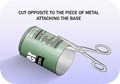
Boost Your Wi-Fi Signal Using a Beer CanNow after you have removed the small can opening piece you can to cut the can in the round diameter like in the image on the right hand side, we are doing this because we have to open that can and make a shape like small antenna.


Step 4.


Boost Your Wi-Fi Signal Using a Beer CanSo now you have to repeat the same step on the other corner but this time you have to leave small space between the cuts so that the can remains attached to the bottom and we will have a look of antenna for our modem - router for boosting purpose. So remember this step is really important to follow else your antenna will not look like how it should be.

Boost Your Wi-Fi Signal Using a Beer Can

Step 5.


So now the main steps are completed, now you have to cut the can vertically from between like in the image on the right hand side. and your antenna will take looks like how it should be and now you only have to attach this antenna to your modem so that we can se its effect.

Boost Your Wi-Fi Signal Using a Beer Can

Step 6.


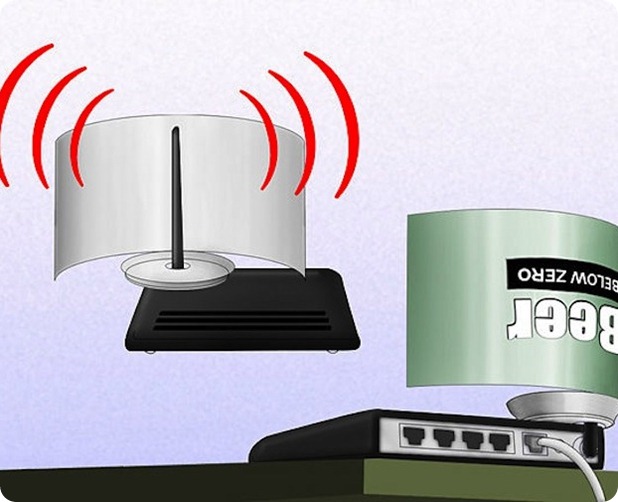
Now last step is too attach this antenna to your modem - router, you can use any adhesive or M-Seal which has really a good hold, so in this step you can change directions of your antenna suiting your will, like in which direction you want it too boost the signal.


Step 7.


Now your antenna is ready for boosting purpose and it will look something like below you can check the image below.
Boost Your Wi-Fi Signal Using a Beer Can
[ Image Credits and Source : Discovery.com ]

How to Force Delete Locked Files Easily with LockHunter


Lock Hunter is a free tool that can delete blocked files which are not getting deleted in one go. It simply scans files and bring the exact conclusion to that thing and what the problem is so you simply have to right click and choose what is blocking that file.How to Force Delete Locked Files Easily with Lock Hunter
So download Lock Hunter from below according to your system if its 32 Bit choose that or choose 64 Bit one.

DOWNLOAD 32 BIT VERSION


DOWNLOAD 64 BIT VERSION

How to Bypass or Remove Survey from Any Website


bypass-surveyInternet is full of crappy websites providing you something you which to have with some limitations, many people upload content on survey generated websites which when passed you will get link to that file and they will earn money, but the real deal is that those websites simply does not work. Either they will say that survey is not completed or survey not available in your country. So we found an interesting survey bypassing or removing JavaScript which can do your job quit perfectly.

See Supported Websites and Get JavaScript Codes :


You can check out list of supported survey websites for which this JavaScript will work and now you just have to grab those JavaScript codes here and than when ever you visit any of the above listed survey website just copy any one JavaScript code and than paste it in your URL section and that’s it done.

Things you should be aware off :


You must have a JavaScript enabled and browser should be compatible, well now days every browser is compatible so make sure its updated. Now this may work or sometimes may not the real deal is that we haven't tried it yet and we are just providing you with the source code so try it out if you find any difficulties make sure to comment below.