Showing posts with label customize. Show all posts

Saturday, 14 July 2012

How To Change Downloads Folder Location In Windows 7


Change Default Download Location In Windows1
All of us love downloading files from the internet. But by default the downloads folder in Windows 7 resides at “C:\Users\User-name\Downloads”. Since C drive is dedicated to Windows so we must not keep our files in this drive. Also in most cases this drive is of less size. So to permanently move this folder to some other location or other drive we can change the location easily and all the old files will get moved to the new location and the new downloads will automatically be downloaded at the new location.

Steps To Change Downloads Folder Location In Windows 7 :

1. Open Computer and in the left pane select Downloads under the favorite menu.
Change Default Download Location In Windows Screenshot 11

2. Right click in the empty area and select properties.
Change Default Download Location In Windows Screenshot 21

3. Select the Location tab and enter the location where you want to store your download files. You can also browse the location by pressing the Move button.
Change Default Download Location In Windows Screenshot 31

4. It will ask for moving the old files , if you want to move all the old files to the new location then select yes else select no.
Change Default Download Location In Windows Screenshot 41


Wednesday, 11 July 2012

Tweak Windows for Faster, Stable & Secure Experience


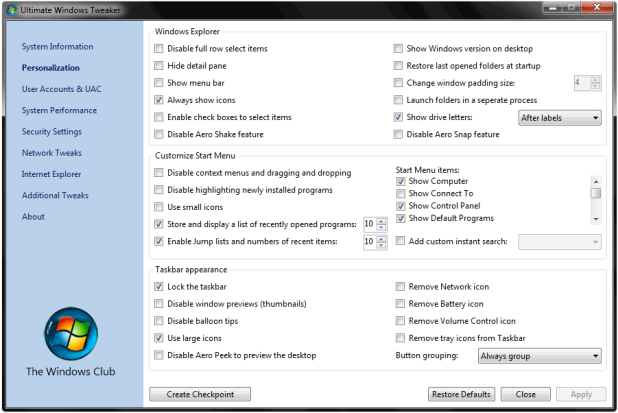
Tweak Windows for Faster, Stable & Secure ExperienceUltimate Windows Tweaker is a freeware utility used to tweak Windows 7 32 bit or 64 bit according to your preference, you can change many things and tweak Windows for fast speed. So after tweaking with this useful utility your can make your system more faster, stable and secure.
Now this new version is update with the support of Internet Explorer, you can tweak Windows Explorer, customize start menu, and many more things so have fun tweaking Windows with this small utility download it from below.
Tweak Windows for Faster, Stable & Secure Experience

DOWNLOAD ULTIMATE WINDOWS TWEAKER