Showing posts with label Tips. Show all posts

Friday, 20 July 2012

How To Create Your First Python Program


Wanna learn how to create your first python program , but don’t know where to start. This is beginner, step by step tutorial with images that will help you trough process.
Step 1
Go to python.org, download latest version and install it.
Step 2
Run IDLE (Python GUI)
Step 3
You can run program via python shell or you can run program as python module . py extension.
Step 3.1
Run program via python shell
In Python shell type
Code:
variable = 'Hello World'
and press enter
then type
Code:
print variable
and press enter, output will be Hello World
This is simple example where we store string “Hello World” into variable and then print it out.
Step 3.2
Run as python script . py
Open notepad and type your code
variable = 'Hello World'
print variable
save as HelloWorld.py
Open IDLE and go to File -> Open and open file with .py extension
After this will appear windows where you’ll able to run module, just press F5 or go to Run -> Run Module

Saturday, 14 July 2012

Download Android Applications for Free with BlackMart


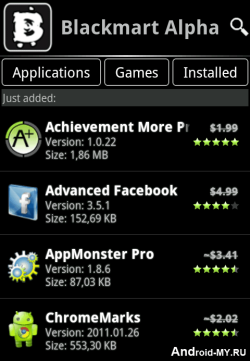
blackmart-alpha-appBlack Market is another similar application to Applanet which we posted earlier and allow you to download thousands of Android Applications and Games right to your device that too for free. It’s a simple .apk app which you can transfer to your device and than install it in a normal way.
Its officially not known as Black Market but its called BlackMart Alpha, it’s a new version which is the improved one and brings many bug fixes. You can Download BlackMart Alpha Android app and than transfer that file to your android device.
After installation Fire-Up the app and your will interface like on the right hand side image, juts browse entire collection of wonderful apps and games which can be downloaded easily.
Well the another way of downloading Android Apps for free is using 4Shared.com. Well hope that you like this application and would love to download many many apps. If you find this post useful than make sure to share it with all your friends.

Wednesday, 11 July 2012

Samsung Galaxy Note - 4 Tips for using Stylus Pen


Samsung-Galaxy-NoteSamsung Galaxy Note has some unique characteristics which makes it the best smartphone ever made by Samsung. Well many people said that it’s the most awesome smartphone ever made in the world but well there are many more phones that compete with it like iPhone 4S and many more phones but well due to its large screen and stylus feature it can do many more advanced stuff than other smartphone.

4 Stylus Pen Tricks for Samsung Galaxy Note :


1. Taking Screenshots : Well you can take screenshots of your phone screen on your Galaxy Note by just pressing the Stylus button and than holding a press on your screen. Now you will get a flash kind of thing and your screen sill be captured now you edit it and add effects to it you can even crop your images and do many fun stuff with it.

2. Loading S-Memo : If you just wanted to use your big screen for writing than you can use S-Memo which has a feature to convert your handwriting to text. Just Press your Stylus button and than double click on the screen, now write anything and than click on Handwriting to Text and that’s it your text will be converted into normal text which you can copy and paste anywhere.

3. Bringing Menu : Your can obviously use the left touch key below to load your menu but if you want to complete that task using your Stylus than you just have to press the stylus button and than stroke upwards direction on your screen that’s it now your menu is loaded.

4. Canceling Tasks : If you wanted to cancel any ongoing task than you just have to press the Stylus button and than stroke on left and you will be able to cancel that task.

So these were some tips which can enhance your experience with the Galaxy Note Stylus Pen, we will be posting many more tips and tricks for Galaxy Note so stay updated.

Create Unique Email Address from Over 200 Domain Names


If someone talks about the email service you are using your answer would be GMail, Yahoo or Hotmail and obviously you would be having some boring email address likeyourname.yourbirthyear@gmail.com oryourname.yourphonenumber@yahoo.com but what if you wanted to create some unique name based on your profession like yourname@teacher.com oryourname@doctor.com or you can also choose from any other niche you would like.
mail.com email registerWell Mail.com brings you all these possibilities for free, with Mail.com you can create your personalized email under any niche you would like you can choose from the regular professional ones, or choose any domain from your hobbies category or give it some techy taste like yourname@techie.com whooh that looks quit hot for a blogger like me. You can check out all domain names here.

Register Email Address with Mail.com :

So now you can register your own professional, unique email address using mail.comregistration page, just add all the basic information choose which domain you want to go with and register your own personalized email address.

Complete List of Run Commands for Easy Access in Windows


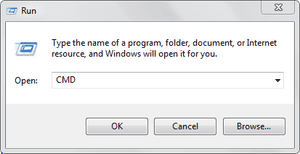
run-panel-cmdRun commands are really useful as it can open your services on the go by just inserting some key-words, well finding them manually from the control panel is a big headache, so we are bringing you some of the useful commands for the RUN Panel which will surely boost your work creativity.

A

Accessibility Controls - access.cpl
Accessibility Wizard - accwiz
Add Hardware Wizard - hdwwiz.cpl
Add/Remove Programs - appwiz.cpl
Administrative Tools - control admintools
Adobe Acrobat (if installed)- acrobat
Adobe Designer (if installed)- acrodist
Adobe Distiller (if installed)- acrodist
Adobe ImageReady (if installed)- imageready
Adobe Photoshop (if installed) - photoshop
Automatic Updates - wuaucpl.cpl

B

Bluetooth Transfer Wizard – fsquirt


C

Calculator - calc
Certificate Manager - certmgr.msc
Character Map - charmap
Check Disk Utility - chkdsk
Clipboard Viewer - clipbrd
Command Prompt - cmd
Component Services - dcomcnfg
Computer Management - compmgmt.msc
Control Panel – control


D

Date and Time Properties - timedate.cpl
DDE Shares - ddeshare
Device Manager - devmgmt.msc
Direct X Control Panel (If Installed)* - directx.cpl
Direct X Troubleshooter - dxdiag
Disk Cleanup Utility - cleanmgr
Disk Defragment - dfrg.msc
Disk Management - diskmgmt.msc
Disk Partition Manager - diskpart
Display Properties - control desktop
Display Properties - desk.cpl
Display Properties (w/Appearance Tab Preselected) - control color
Dr. Watson System Troubleshooting Utility - drwtsn32
Driver Verifier Utility – verifier


E

Event Viewer - eventvwr.msc


F

Files and Settings Transfer Tool - migwiz
File Signature Verification Tool - sigverif
Findfast - findfast.cpl
Firefox (if installed) - firefox
Folders Properties - control folders
Fonts - control fonts
Fonts Folder - fonts
Free Cell Card Game – freecell


G

Game Controllers - joy.cpl
Group Policy Editor (XP Prof) - gpedit.msc


H

Hearts Card Game - mshearts
Help and Support - helpctr
HyperTerminal – hypertrm


I

Iexpress Wizard - iexpress
Indexing Service - ciadv.msc
Internet Connection Wizard - icwconn1
Internet Explorer - iexplore
Internet Properties - inetcpl.cpl
Internet Setup Wizard - inetwiz
IP Configuration (Display Connection Configuration)- ipconfig /all
IP Configuration (Display DNS Cache Contents) - ipconfig /displaydns
IP Configuration (Delete DNS Cache Contents) - ipconfig /flushdns
IP Configuration (Release All Connections) - ipconfig /release
IP Configuration (Renew All Connections) - ipconfig /renew
IP Configuration (Refreshes DHCP & Re-Registers DNS) - ipconfig /registerdns
IP Configuration (Display DHCP Class ID) - ipconfig /showclassid
IP Configuration (Modifies DHCP Class ID)- ipconfig /setclassid


J

Java Control Panel (If Installed) - jpicpl32.cpl
Java Control Panel (If Installed) – javaws


K

Keyboard Properties - control keyboard


L

Local Security Settings - secpol.msc
Local Users and Groups - lusrmgr.msc
Logs You Out Of Windows – logoff


M

Malicious Software Removal Tool - mrt
Microsoft Access (if installed) - access.cpl
Microsoft Chat - winchat
Microsoft Excel (if installed) - excel
Microsoft Frontpage (if installed) - frontpg
Microsoft Movie Maker - moviemk
Microsoft Paint - mspaint
Microsoft Powerpoint (if installed) - powerpnt
Microsoft Word (if installed) - winword
Microsoft Syncronization Tool - mobsync
Minesweeper Game - winmine
Mouse Properties - control mouse
Mouse Properties - main.cpl


N

Nero (if installed) - nero
Netmeeting - conf
Network Connections - control netconnections
Network Connections- ncpa.cpl
Network Setup Wizard - netsetup.cpl
Notepad - notepad
Nview Desktop Manager (If Installed) - nvtuicpl.cpl


O

Object Packager – packager
ODBC Data Source Administrator - odbccp32.cpl
On Screen Keyboard - osk
Opens AC3 Filter (If Installed)- ac3filter.cpl
Outlook Express – msimn


P

Paint - pbrush
Password Properties - password.cpl
Performance Monitor - perfmon.msc
Performance Monitor - perfmon
Phone and Modem Options - telephon.cpl
Phone Dialer - dialer
Pinball Game - pinball
Power Configuration - powercfg.cpl
Printers and Faxes - control printers
Printers Folder - printers
Private Character Editor – eudcedit


Q

Quicktime (If Installed) - QuickTime.cpl
Quicktime Player (if installed) – quicktimeplayer


R

Real Player (if installed) - realplay
Regional Settings - intl.cpl
Registry Editor - regedit
Registry Editor - regedit32
Remote Access Phonebook - rasphone
Remote Desktop - mstsc
Removable Storage - ntmsmgr.msc
Removable Storage Operator Requests - ntmsoprq.msc
Resultant Set of Policy (XP Prof) - rsop.msc


S

Scanners and Cameras - sticpl.cpl
Scheduled Tasks - control schedtasks
Security Center - wscui.cpl
Services - services.msc
Shared Folders - fsmgmt.msc
Shuts Down Windows - shutdown
Sounds and Audio - mmsys.cpl
Spider Solitare Card Game - spider
SQL Client Configuration - cliconfg
System Configuration Editor - sysedit
System Configuration Utility - msconfig
System File Checker Utility (Scan Immediately) - sfc /scannow
System File Checker Utility (Scan Once At Next Boot)- sfc /scanonce
System File Checker Utility (Scan On Every Boot)- sfc /scanboot
System File Checker Utility (Return to Default Setting) - sfc /revert
System File Checker Utility (Purge File Cache) - sfc /purgecache
System File Checker Utility (Set Cache Size to size x) - sfc /cachesize=x
System Information - msinfo32
System Properties - sysdm.cpl


T

Task Manager - taskmgr
TCP Tester - tcptest
Telnet Client - telnet
Tweak UI (if installed) – tweakui


U

User Account Management - nusrmgr.cpl
Utility Manager – utilman


W

Windows Address Book - wab
Windows Address Book Import Utility - wabmig
Windows Backup Utility (if installed) - ntbackup
Windows Explorer - explorer
Windows Firewall - firewall.cpl
Windows Address Book - wab
Windows Address Book Import Utility - wabmig
Windows Backup Utility (if installed) - ntbackup
Windows Explorer - explorer
Windows Firewall - firewall.cpl
Windows Magnifier - magnify
Windows Management Infrastructure - wmimgmt.msc
Windows Media Player - wmplayer
Windows Messenger - msmsgs
Windows Picture Import Wizard (need camera connected) - wiaacmgr
Windows System Security Tool - syskey
Windows Update Launches - wupdmgr
Windows Version (to show which version of windows) - winver
Windows XP Tour Wizard - tourstart
Here ends the list of these useful commands, well hope that these commands really increase your productivity and hence fasten your work experience, enjoy and do share this post with all your friends.

How to Install Paid Android Applications For Free


Update : Many people commented that they see blank screen while using Applanet app, well I think so that will be fixed soon or else you can use BlackMart Alpha app for Android device which is similar to the Applanet app but works somewhat fine.
applanet app androidAndroid is one of the best OS available right now as its is owned and developed by Google. Now all the latest phones comes with this new OS preinstalled in them and its really awesome. You have many apps and games which you can play on your smart phone but the thing is that many good ones are paid, so to get those paid ones you have to link your debit card than pay them and than you can enjoy those games or you can simply install a simple app with which you can download those apps for free of cost.
Applanet is that small awesome application for Android devices with which you can download any apps or games those are paid for free. It is somewhat same like Installous app we have for iPhone which we install using Cydia.

How Applanet Works :

Applanet is a simple app for Android which simply provides with the paid apps and games for free which you can download right on phone. You simply download and install this app and than search - download - install any application from it for free. Its totally free of charge and simply takes few minutes to install.

How to Download & Use Applanet :

Now if you also want to install paid apps and games for free on your android device than simply Download Applanet App for your android phone and than copy it to your phone, now navigate to it through file manager or anything and click on it to install it.
Now simply navigate to this app from your application menu and fire it up, enjoy searching and downloading apps on the go. If you find this difficult and cannot make it up with it than comment below with your problem and hopefully I will solve it for you.

Activate Microsoft Office 2010 with EZ - Activator


Microsoft Office 2010 is the best office suit which any business person will need to take over his business, not only the business person but in todays generation teenagers also need Microsoft Word for their school projects. Well it might be used for anything but there’s always some limitation in good software's, so by limitations I mean that you have buy that software to use it. And if we go with the price many people are not satisfied with the price as they think its really expensive.
So we brought an easy Office Toolkit which will make your Microsoft Office 2010 full version really easily that called Office Toolkit 2010. This really easy to use and can be done without any technical knowledge so check all the steps below how to use this amazing toolkit.
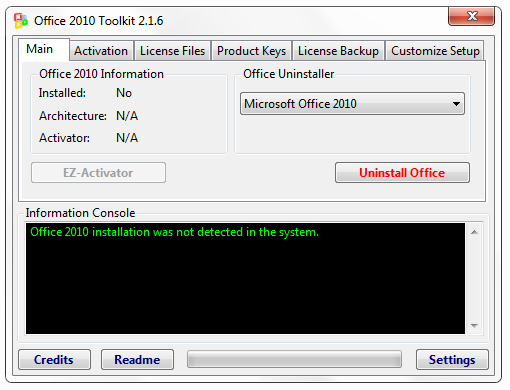
Office 2010 Tookit
So this is the Office Toolkit which you can use to easily activate your Microsoft Office 2010, well it has many options you can tweak according to your preference but we are going to use just one option to activate you Office. So its saying Office was not detected on your system that’s because I have not installed this on my PC but when you will install office it will not say that think so check below steps to see how it works.

How to Download and Use EZ-Activator :

2. Now you need to have Microsoft .NET Framework, if you do not have Google for it and download it out.
3. Now you have everything ready Office Installed and Toolkit downloaded now its time for some fun.
4. Run this Toolkit, it will ask for permission simply press YES and you will see above window opened.
5. Now you just have to Press EZ-Activator Button and it will start processing your request and make your Office full version. You will get message that your office is now full version enjoy.
So now you have made your Office 2010 Full Version and you can use all its feature for free and for unlimited time enjoy this best Office Suit and have fun :)

Thursday, 21 April 2011

My first Post

Hello Readers,
Its my first post in Blogger. Kindly wait for sometime when I'll start updating this blog daily with Astonishing Tricks and Tips for you.

This blog is under construction.