Showing posts with label steps. Show all posts
Showing posts with label steps. Show all posts
Thursday, 19 July 2012
How To Crash A PC Using The E-bomb
This summary is not available. Please
click here to view the post.

Saturday, 14 July 2012
How To Block A Program From Using Your Internet Connection
 A way to block your applications from using your internet connection. This can be useful when you don’t want an application to update or to stop an application from checking that the serial or the crack you applied was genuine or not.

Open Control Panel From Start Menu

Open Windows Firewall From Control Panel

Choose Advanced Setting on the left side In Windows Firewall Window

A windows like this will pop up

Select Outbound Rules From Left Side

A windows Similar to the above will Pop up , click next.

Give the program path , choose the exe file of the program ( you can find it from the program installation directory ). After selecting the appropriate directory press next.

Select Next

Select Next

Give any name , usually we keep the programs name for future reference. Click Finish and your program will be listed as black list and will not be able to connect to the internet.
Wednesday, 11 July 2012
Boost Your Wi-Fi Signal Using an empty Beer Can
 So internet is used by everyone and if you are @ home you will always want that your whole house is covered by Wi-Fi so that anytime, anywhere you can access it so internet speed is must @ long distance well now you can get some nice Wi-Fi Boosting using a simple and efficient Beer Can well I grabbed this amazing trick from Discovery Channel’s Website and I am posting it on my website.
Follow the below steps to boost your Wi-Fi Network :

Step 1.
Empty a Beer can obliviously after drinking that and than you have to make sure that its washed thoroughly so that there is no smell or anything left by that liquid Beer, because if anything's is left than it will be a problem and smell will be there in your whole room.

Step 2.
Now after washing that Beer Can thoroughly you have to remove that small can opening piece you can see that in the image on the right hand side.
Step 3.
 Now after you have removed the small can opening piece you can to cut the can in the round diameter like in the image on the right hand side, we are doing this because we have to open that can and make a shape like small antenna.
Step 4.
 So now you have to repeat the same step on the other corner but this time you have to leave small space between the cuts so that the can remains attached to the bottom and we will have a look of antenna for our modem - router for boosting purpose. So remember this step is really important to follow else your antenna will not look like how it should be.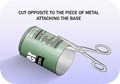
Step 5.
So now the main steps are completed, now you have to cut the can vertically from between like in the image on the right hand side. and your antenna will take looks like how it should be and now you only have to attach this antenna to your modem so that we can se its effect.

Step 6.
Now last step is too attach this antenna to your modem - router, you can use any adhesive or M-Seal which has really a good hold, so in this step you can change directions of your antenna suiting your will, like in which direction you want it too boost the signal.
Step 7.
Now your antenna is ready for boosting purpose and it will look something like below you can check the image below.
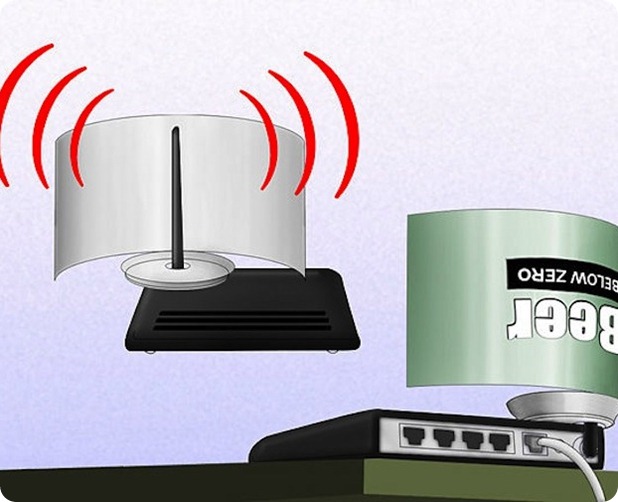
[ Image Credits and Source : Discovery.com ]
Subscribe to:
Posts (Atom)