Showing posts with label speedup. Show all posts

Saturday, 14 July 2012

MSCONFIG : Speed Up Your Computer Without Any Software


MSCONFIG or “Microsoft System Configuration Utility” is designed to help you troubleshoot problems with your computer.
It is an inbuilt utility that lets you select applications which you want to start up on windows boot up and application that you don’t want to start up with windows. You can open msconfig by pressing “Windows Key + R” or in Windows 7 and Vista , type msconfig in search bar and press enter.
After Opening MSCONFIG, go to Startup tab as shown below. Now deselect applications that you want to stop loading with windows. When done press OK. Restart your computer and you will see that your computer now starts faster.
Fullscreen+capture+9112011+34518+PM.bmp3

Please Comment in case you've any type of problem regarding using this.

Thursday, 12 July 2012

Boot WinXp Fast

1. Open notepad.exe, type "del c:\windows\prefetch\ntosboot-*.* /q" (without the quotes) & save as "ntosboot.bat" in c:\
2. From the Start menu, select "Run..." & type "gpedit.msc".
3. Double click "Windows Settings" under "Computer Configuration" and double click again on "Shutdown" in the right window.
4. In the new window, click "add", "Browse",... locate your "ntosboot.bat" file & click "Open".
5. Click "OK", "Apply" & "OK" once again to exit.
6. From the Start menu, select "Run..." & type "devmgmt.msc".
7. Double click on "IDE ATA/ATAPI controllers"
8. Right click on "Primary IDE Channel" and select "Properties".
9. Select the "Advanced Settings" tab then on the device or 1 that doesn't have 'device type' greyed out select 'none' instead of 'autodetect' & click "OK".
10. Right click on "Secondary IDE channel", select "Properties" and repeat step 9.
11. Reboot your computer.

Wednesday, 11 July 2012

Boost PC Performance for High End Gaming Experience


Boost PC Performance for Hign End Gaming ExperienceGBoost is a free Windows Application which helps you to boost your PC Performance for ultimate Gaming Experience. GBoost simply turns off some unwanted services which free up RAM for unleashing game experience.
So Boosting process is really simple you simply have to press the Boost button which you can see in the right hand side image, and after your game has completed your can simply press the Restore to get everything in the normal more.
So enjoy games without any restriction and any jerk and play safe game really easily. This is freeware utility so you do not need to buy this or it does not have any time restriction so you can use it and share it with all your friends.
So have fun using this amazing utility and make your gaming experience much more fun and frolic.


DOWNLOAD GBOOST

Boost Torrent Speeds using UTorrent Turbo Booster


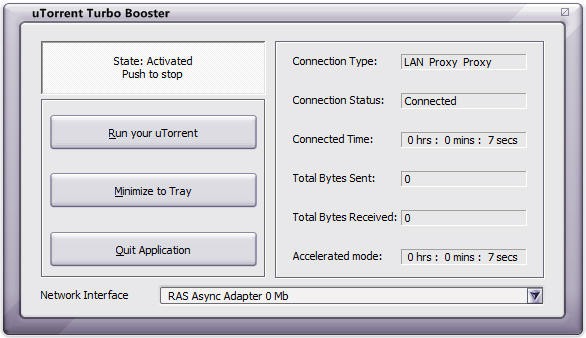
UTorrent Turbo Booster is a kind of plugin for the most popular p2p client called UTorrent which will improve speeds and functionality of your torrent application. Now this tool is designed for getting your speeds higher and making your downloads fast and much more stable by increasing seeds which are almost lost during the transaction. So now using this software you will be able to download your movies, songs and games at much higher speeds.
utorrent-turbo-booster


Download UTorrent Turbo Booster :

Well if you are really keen of getting this freeware utility for boosting your UTorrent downloads than you can download it from software informer website for free. You can also more in details about this software right on their website. So now have fun boosting your speeds and downloading awesome stuff.