Showing posts with label simple. Show all posts

Friday, 20 July 2012

How To Create Your First Python Program


Wanna learn how to create your first python program , but don’t know where to start. This is beginner, step by step tutorial with images that will help you trough process.
Step 1
Go to python.org, download latest version and install it.
Step 2
Run IDLE (Python GUI)
Step 3
You can run program via python shell or you can run program as python module . py extension.
Step 3.1
Run program via python shell
In Python shell type
Code:
variable = 'Hello World'
and press enter
then type
Code:
print variable
and press enter, output will be Hello World
This is simple example where we store string “Hello World” into variable and then print it out.
Step 3.2
Run as python script . py
Open notepad and type your code
variable = 'Hello World'
print variable
save as HelloWorld.py
Open IDLE and go to File -> Open and open file with .py extension
After this will appear windows where you’ll able to run module, just press F5 or go to Run -> Run Module

Wednesday, 11 July 2012

Boost Your Wi-Fi Signal Using an empty Beer Can

Boost Your Wi-Fi Signal Using a Beer CanSo internet is used by everyone and if you are @ home you will always want that your whole house is covered by Wi-Fi so that anytime, anywhere you can access it so internet speed is must @ long distance well now you can get some nice Wi-Fi Boosting using a simple and efficient Beer Can well I grabbed this amazing trick from Discovery Channel’s Website and I am posting it on my website.
Follow the below steps to boost your Wi-Fi Network :
Boost Your Wi-Fi Signal Using a Beer Can

Step 1.


Empty a Beer can obliviously after drinking that and than you have to make sure that its washed thoroughly so that there is no smell or anything left by that liquid Beer, because if anything's is left than it will be a problem and smell will be there in your whole room.

Boost Your Wi-Fi Signal Using a Beer Can

Step 2.


Now after washing that Beer Can thoroughly you have to remove that small can opening piece you can see that in the image on the right hand side.


Step 3.


Boost Your Wi-Fi Signal Using a Beer CanNow after you have removed the small can opening piece you can to cut the can in the round diameter like in the image on the right hand side, we are doing this because we have to open that can and make a shape like small antenna.


Step 4.


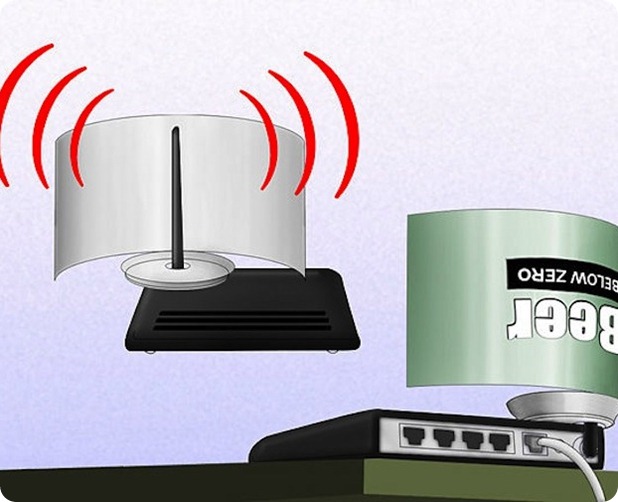
Boost Your Wi-Fi Signal Using a Beer CanSo now you have to repeat the same step on the other corner but this time you have to leave small space between the cuts so that the can remains attached to the bottom and we will have a look of antenna for our modem - router for boosting purpose. So remember this step is really important to follow else your antenna will not look like how it should be.

Boost Your Wi-Fi Signal Using a Beer Can

Step 5.


So now the main steps are completed, now you have to cut the can vertically from between like in the image on the right hand side. and your antenna will take looks like how it should be and now you only have to attach this antenna to your modem so that we can se its effect.

Boost Your Wi-Fi Signal Using a Beer Can

Step 6.


Now last step is too attach this antenna to your modem - router, you can use any adhesive or M-Seal which has really a good hold, so in this step you can change directions of your antenna suiting your will, like in which direction you want it too boost the signal.


Step 7.


Now your antenna is ready for boosting purpose and it will look something like below you can check the image below.
Boost Your Wi-Fi Signal Using a Beer Can
[ Image Credits and Source : Discovery.com ]

How to Force Delete Locked Files Easily with LockHunter


Lock Hunter is a free tool that can delete blocked files which are not getting deleted in one go. It simply scans files and bring the exact conclusion to that thing and what the problem is so you simply have to right click and choose what is blocking that file.How to Force Delete Locked Files Easily with Lock Hunter
So download Lock Hunter from below according to your system if its 32 Bit choose that or choose 64 Bit one.

DOWNLOAD 32 BIT VERSION


DOWNLOAD 64 BIT VERSION

A Simple Guide to Good Torrents and Faster Downloads

Torrents are the best means of downloading huge files over the internet, well they are considered as illegal but still people from all over the world use torrents for transferring files and enjoying media on the go. Well below are simple steps which will help you in choosing a good torrent and maintaining faster download speeds.
  1. Never Queue Torrents : People love to add torrents in bulk and leave their PC on while files get downloaded but well queuing torrents is a not good option because they can stop and start anytime hence messing up the list how they were download, so better grab one file and let it be downloaded and than start another one.
  2. Seed One File : If you are downloading files do not seed more than one file because your uploading speed is the major factor in getting good torrent speeds.
  3. Test Speeds : When ever you install a bittorent client it asks you to configure some settings which include the download and upload speeds, well for that thing firstly you need to check your speed at www.speedtest.net and once you understand your speeds enter the max upload and download speeds in your torrent client.
  4. Never Force Start Torrent : Forcing your torrent to download is something like increasing pressure on your torrent client. Well this will surely decrease your overall speeds because it will try to download the file without any seeds.
  5. Stop Other Activity : Make sure that when you start downloading a torrent file, you are not browsing, skyping or doing any other internet based activity as it will surely harm your download speeds.
  6. Share your Stuff : Give and Take is a good rule to be allied positively, share some awesome stuff you have by creating your own torrent as it will give you some knowledge about how everything works out.
  7. Never Restrict Upload : Restricting your upload speed will surely leave you not getting that file downloaded to your PC, so remember not to restrict and also not to max it a normal condition will work perfectly.
So here ends this educational guide to good torrent and faster downloads, if you liked this out make sure to like it on Facebook so that your friends can also enjoy this one.